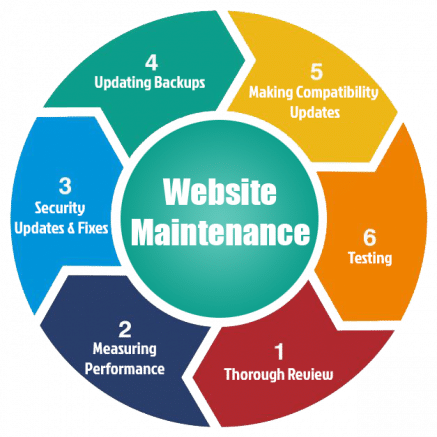
A business website today functions as the center of digital operations. It represents credibility, supports marketing, and drives conversions. However, building a website is only the beginning. Maintaining it properly determines long-term success. Neglecting website maintenance leads to performance degradation, security vulnerabilities, and lower search rankings. Therefore, consistent upkeep, monitoring, and optimization remain critical for sustained performance and growth. In this guide, we explore best practices for keeping up with website maintenance and the essential tasks every organization should prioritize. Find out more here on best practices for keeping up with website maintenance and critical tasks associated with it by industry experts.
Why Ongoing Website Maintenance Matters
Website maintenance ensures functionality, security, and relevance. Without regular updates, even the best websites lose efficiency and credibility. Code becomes outdated, plugins conflict, and broken elements weaken user experience. Moreover, neglected websites invite cyberattacks and SEO penalties. A healthy, well-maintained website signals professionalism and trust. Visitors expect fast loading times, responsive layouts, and up-to-date content. Therefore, consistent maintenance keeps the website aligned with evolving standards and user expectations.
The Impact on Business Performance
Website performance directly affects brand perception and conversions. A slow, outdated, or broken website drives potential customers away. Studies show that over 50% of visitors abandon sites that take longer than three seconds to load. Furthermore, a single technical error can disrupt shopping carts, lead generation forms, or analytics tracking. On the other hand, a properly maintained website improves speed, uptime, and functionality, creating smoother customer experiences. Therefore, website maintenance is not an expense—it is an investment in operational excellence.
SEO and Visibility Depend on Maintenance
Search engines value well-maintained websites. Google’s ranking algorithms measure speed, security, content freshness, and technical integrity. Outdated code, broken links, or missing metadata reduce visibility. Meanwhile, fresh content and strong site structure enhance authority. Therefore, consistent website maintenance ensures SEO signals remain strong and rankings remain stable. Businesses that ignore maintenance eventually experience traffic decline and loss of digital credibility.
Core Best Practices for Website Maintenance
Every website, regardless of industry or size, benefits from a structured maintenance plan. Consistency ensures reliability, while automation and documentation prevent oversight. Below are the best practices that help businesses maintain peak website performance year-round.
1. Monitor Website Speed and Performance
Website speed remains one of the most important ranking and user experience factors. A one-second delay in load time can reduce conversions by up to 20%. Therefore, test speed regularly using performance tools and monitor core web vitals such as loading, interactivity, and visual stability. Compress images, reduce unnecessary scripts, and optimize caching to maintain peak performance.
2. Keep Software and Plugins Updated
Outdated software represents one of the most common cybersecurity risks. Websites built on platforms such as WordPress, Shopify, or Magento rely on plugins and extensions that require frequent updates. These updates patch vulnerabilities, improve functionality, and ensure compatibility. Therefore, apply updates monthly, test after installation, and remove unused components to minimize risk.
3. Back Up Your Website Regularly
Unexpected errors, hacks, or hosting issues can wipe out data instantly. Therefore, schedule automatic backups daily or weekly, depending on website activity. Maintain at least two backup locations: one on the hosting server and another in secure cloud storage. Verify backups periodically to confirm they can be restored successfully. Having recent backups guarantees peace of mind and operational resilience.
4. Strengthen Website Security
Cybersecurity threats increase every year. Malware, phishing, and brute-force attacks target vulnerable sites daily. Therefore, security maintenance must be proactive, not reactive. Install SSL certificates, enable firewalls, use strong passwords, and implement two-factor authentication for administrators. Regularly scan for malware and review access logs for suspicious activity. A secure website builds trust and prevents costly breaches.
5. Check for Broken Links and Errors
Broken links frustrate visitors and harm SEO rankings. Pages that lead to “404 Not Found” signals poor maintenance. Therefore, scan the website monthly for broken internal or external links and fix or redirect them promptly. Keeping URLs current ensures better navigation, stronger indexing, and improved user experience.
6. Audit and Refresh Content
Website content must remain accurate, relevant, and optimized. Review articles, product descriptions, and landing pages regularly. Update outdated statistics, refresh imagery, and adjust tone for clarity and engagement. Furthermore, repurpose older content into modern formats such as short-form videos or infographics. Consistent updates demonstrate authority and keep search rankings strong.
7. Optimize Images and Media Files
Unoptimized images slow down load speed and waste bandwidth. Therefore, compress image files, convert them to next-generation formats like WebP, and use responsive scaling for mobile devices. Ensure every image includes alt text for accessibility and SEO benefits. Proper image optimization improves both user experience and ranking performance.
8. Test Forms, Checkout Processes, and Lead Flows
Forms and checkout systems generate leads and revenue. Broken or misconfigured forms result in lost opportunities. Therefore, test all forms regularly, including contact submissions, payment gateways, and newsletter sign-ups. Confirm that form notifications reach the right recipients and data integrates correctly with CRM systems.
9. Maintain Mobile Responsiveness
More than 60% of all online traffic comes from mobile devices. A website that performs poorly on mobile loses potential customers instantly. Therefore, test across various devices and browsers to ensure layouts, fonts, and images adapt correctly. Mobile responsiveness also influences SEO rankings, as Google prioritizes mobile-friendly websites.
10. Review Hosting and Server Performance
Hosting quality impacts site speed, uptime, and scalability. Therefore, monitor hosting metrics regularly and ensure the server meets traffic demands. If performance issues persist, consider upgrading to a managed hosting plan with built-in caching, automatic updates, and security monitoring. Reliable hosting guarantees consistent user experience.
Critical Technical Tasks for Every Website
Beyond visual and content updates, technical maintenance ensures a website’s stability and SEO strength. Businesses that neglect technical care often face major downtime or ranking penalties.
Keep the CMS Core Updated
Whether using WordPress, Joomla, or Drupal, keeping the CMS core updated ensures performance and security. Backup the website before updates and test afterward for compatibility. Ignoring these updates exposes the site to cyberattacks and functionality errors.
Review and Renew SSL Certificates and Domains
Expired SSL certificates create browser warnings that scare users away. Domain lapses cause websites to go offline completely. Therefore, renew domains and certificates before expiration. Use reminders or automated renewals to avoid interruptions.
Verify Sitemap and Robots.txt Files
Sitemaps and robots.txt files guide search engines. If incorrectly configured, important pages may become invisible. Therefore, confirm that sitemaps update automatically after new content uploads and ensure robots.txt allows crawling of essential sections.
Evaluate Accessibility and Compliance
Web accessibility ensures inclusion for users with disabilities and improves overall usability. Check compliance with WCAG guidelines, add alt text, and maintain sufficient contrast ratios. Accessible design also supports SEO because it improves readability and engagement.
SEO and Analytics Maintenance
Search optimization and analytics require continuous refinement. SEO depends on consistent technical accuracy, while analytics confirm performance effectiveness.
Track Keyword and Traffic Trends
Monitor how target keywords perform monthly. Update meta titles, descriptions, and headings for relevancy. If traffic declines, analyze page performance to identify ranking factors that need attention.
Maintain Internal and External Links
Link structures change as websites grow. Maintaining healthy internal links ensures search engines crawl pages efficiently. Replace outdated external links and remove low-quality backlinks that damage reputation.
Update Metadata and Structured Data
Search engines depend on metadata and schema markup for accurate indexing. Update structured data to improve visibility in AI-driven search and featured snippets. Optimized metadata strengthens click-through rates and supports long-term SEO growth.
Review Analytics and Conversion Data
Analytics provide insight into visitor behavior. Review data monthly to measure bounce rates, session durations, and conversion paths. Identify drop-off points in user journeys and optimize them to increase engagement and ROI.
Scheduling Regular Maintenance
Website maintenance works best with structure. Assign specific tasks to weekly, monthly, and quarterly cycles to ensure comprehensive coverage. Weekly maintenance should include speed checks, content updates, and uptime monitoring. Monthly maintenance should involve security scans, plugin updates, and link repairs. Quarterly tasks should focus on SEO audits, performance reports, and strategic improvements.
Automating and Documenting the Process
Automation simplifies recurring maintenance tasks and ensures reliability. Set up automated backups, uptime monitoring, and performance alerts. However, never rely exclusively on automation. Human oversight remains essential for quality control, strategy, and creative improvement. Furthermore, document all maintenance actions in a digital log. Recording updates, fixes, and audit results builds transparency and accountability.
Maintaining a Secure and Scalable Infrastructure
Security and scalability work hand in hand. As websites grow, new integrations and traffic volumes test infrastructure limits. Regularly audit database performance, bandwidth usage, and security policies. Implement CDN (content delivery network) systems to distribute load and enhance speed worldwide. Scalable, secure websites remain resilient against threats and capable of handling future expansion.
Final Thoughts
A website reflects the health of a business. Ongoing maintenance ensures it stays secure, fast, and reliable. Regular updates, audits, and security measures prevent downtime, protect data, and sustain SEO visibility. Moreover, consistent attention signals professionalism to customers and confidence to search engines. In an AI-driven digital marketplace, websites require constant care to remain competitive. By following structured maintenance practices and addressing critical tasks proactively, businesses safeguard their most valuable digital asset—their website—and ensure long-term online success. Find out more here on best practices for keeping up with website maintenance and critical tasks associated with it by industry experts.